Step-by-Step Guide: Removing Toxic Backlinks Using Google Search Console and ChatGPT

Even if your content is high quality and your on-page SEO is well optimised, spammy backlinks can still quietly damage your site’s search rankings. In this guide, I’ll show you a simple, step-by-step process to identify harmful links and remove them using Google Search Console and ChatGPT, helping you protect your site’s SEO performance and keep its reputation strong.
Even with excellent content and on-page SEO, spammy backlinks might negatively impact your site’s rating. In this blog post, I’ll show you how I utilise Google Search Console and ChatGPT to discover and remove them.
Export Backlinks from GSC
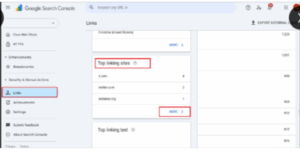
* Open Google Search Console.
* Go to Links → External Links.
* Under Top linking sites, click More.
* Click Export and choose CSV format.
This file will show all referring domains that link to your site.
Upload To ChatGPT
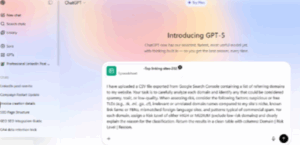
Open ChatGPT and upload the CSV file you exported from Google Search Console.
Prompt
I have uploaded CSV file exported from Google Search Console containing a list of referring domains to my website. Your task is to carefully analyze each domain and identify any that could be considered spammy, toxic, or low-quality.
When assessing risk, consider the following factors: suspicious or free TLDs (e.g., .tk, .ml, .ga, .cf, .info, .top), irrelevant or unrelated domain names compared to my site’s niche, known link farms or PBNs, mismatched foreign-language sites, and patterns typical of commercial spam.
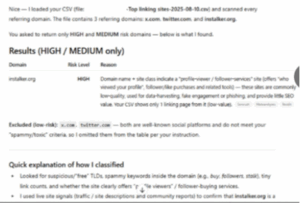
For each domain, assign a Risk Level of either HIGH or MEDIUM (exclude low-risk domains) and clearly explain the reason for the classification. Return the results in a clean table with columns.
Check the Result
Once you have received the report, carefully evaluate each backlink. Identify domains that are dubious, irrelevant, or of extremely low quality. If a link is plainly from a spammy or damaging website, add it to your disavow list.
Result
Create and Submit Your Disavow File
It’s time to prepare your disavow file:
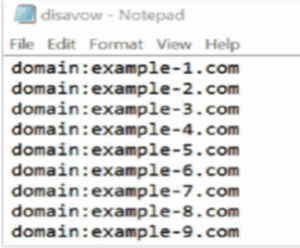
Open Notepad or any plain text editor on your computer.
Add each domain in a new line, using this format:
domain:spamsite.com
domain:badlinks.tk
domain:toxicdomain.ml
Save the file as a .txt file, make sure it’s plain text with no extra formatting.
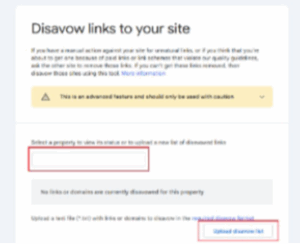
Upload to Google Disavow Tool
Open the Google Disavow Tool:
search.google.com/search-console/disavow-links
Choose your verified website from the list.
Click “Upload” and select the .txt file you created.
Submit the file and confirm the upload.
Pro Tip
Run a backlink audit every 3 months. This is especially important when:
You are actively building new backlinks
Your website traffic drops suddenly
You suspect harmful or spammy backlinks targeting your site
Regular checks help you find and fix issues early because preventing damage is always easier than fixing it later.
Keeping an eye on your backlinks is important to make sure your website stays healthy and ranks well in search results. By regularly checking your links with tools like Google Search Console and carefully removing any spammy or poor-quality ones, you can stop harmful links from hurting your site. Doing this simple task every few months helps your website stay strong, reliable, and trusted by both users and search engines.
eWoke is a trusted SEO company in Kochi, Kerala, helping businesses strengthen their digital presence with tailored strategies. Their services include keyword research, on-page and off-page SEO, technical audits, and content optimization. With expertise in both local and global SEO practices, eWoke ensures ethical, white-hat techniques aligned with Google’s latest updates. Whether boosting visibility for local businesses, startups, or enterprises, their team blends market insights and technical skills to deliver improved rankings, quality traffic, and long-term growth online.
If you want to know more about our informational blog, connect with our LinkedIn page.
Recent Posts
Google Ads Book Buttons Expand To Search & Performance Max
Google is expanding the book button through Reserve with Google partner integration to Google Ads Search and Performance Max ...
OpenAI Allows Health & Finance Ads in ChatGPT: What Marketers Need to Know
The advertising landscape for AI platforms is changing rapidly, and OpenAI’s latest ChatGPT advertising policy updates are ...
How SAGE Can Simplify SEO, AEO and GEO Optimization
Search is changing rapidly. Websites are no longer competing only for traditional Google rankings. With AI-powered search, fe...
What Is HeadingsMap and How Does It Help With SEO?
When optimising a website for search engines, a clear and well-organised heading structure is essential. HeadingsMap is a han...