How to Track User Journey In GA4 To Make SEO Wins More Visible

SEO teams can tie organic performance to revenue by mapping full user journeys in GA4 and uncovering hidden conversion opportunities.
Inside many companies, SEO reporting continues to rely primarily on popular metrics such as keyword tracking, traffic graphs, and so on, while the leadership side raises a different question: “How much revenue did this actually drive?
Years ago, this was often assumed to be a communication gap. Over time, it became clear that the issue wasn’t communication at all, but measurement. Most SEO dashboards focus only on visibility and traffic, leaving decision-makers unable to understand the full value.
Traditional metrics simply tell us how users arrived. They reveal very little about what happens following the click. However, we must determine whether users locate what they need, engage with information, go through critical journeys, and eventually convert.
Why Traditional SEO Reporting Falls Short
Most reports end at: Impression > Click.
But the real value-generating user journey continues beyond that:
Impression > Click > Landing > Engagement > Micro-Conversion > Conversion/Drop-off.
What noticed is that SEO value isn’t missing, but it’s hidden in steps three to six. Once started looking at the efforts we do through this perspective, opportunities that weren’t visible before became obvious. And many of the biggest wins came from improving how existing traffic behaved.
What Full User Journey Tracking Lets You See
When you track the full user journey, you can:
Understand which organic sessions lead to business outcomes.
See exactly where high-intent users drop off.
Prioritize content or UX improvements with clearer reasoning.
Identify which landing pages attract real buyers.
Quantify the value of SEO more confidently.
The conversation moves from “traffic increased” to “we reduced friction on this journey and enabled X conversions.” You and stakeholders have quite different levels of clarity.
Tracking the full user journey in GA4 transforms SEO from a visibility-focused activity into a measurable revenue driver. By moving beyond impressions and clicks to understand engagement, micro-conversions, and final outcomes, SEO teams can clearly show how organic traffic contributes to real business results. This approach uncovers where users struggle, where intent is strongest, and where small improvements can unlock significant gains.
Most importantly, it changes the conversation with stakeholders from surface-level traffic metrics to meaningful insights about customer behavior, reduced friction, and tangible conversions making SEO’s true value visible and defensible.
How to Set Up User Journey Tracking In GA4 In 4 Steps#
You don’t need to conduct a whole analytics makeover to start seeing better results. A few easy actions are sufficient to determine where the tale breaks.
Google Analytics 4 already provides the tools; all you need is a systematic strategy.
Here are the steps to follow:
Start with Explore > Funnel Exploration
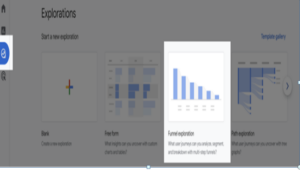
Go to the Explore section in the left panel and select Funnel exploration. When the Exploration report opens, default metrics are already set. To analyze a specific user journey, customize these metrics according to your requirements in the next step.
Set Variables
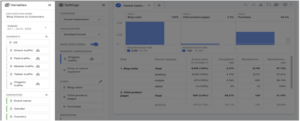
Name your Exploration report and choose the date range you want to analyze (you can also compare date ranges). Use pre-defined Segments or click the plus (+) icon to create or select new ones. Similarly, choose from existing Dimensions or add new dimensions by clicking the plus (+) icon.
Configure Tab Settings
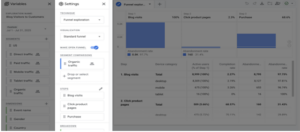
Choose between an open or closed funnel based on user behavior use an open funnel if users can enter at different stages, and a closed funnel if everyone starts at step one. Drag the required segment(s) into Segment Comparisons to analyze specific user types (e.g., Organic traffic). Finally, define the Steps by clicking the pencil icon and setting events and parameters that represent the user journey you want to analyze.
Use Breakdowns To Uncover Detailed Insights (Optional)
These breakdowns often explain patterns that traffic metrics can’t.
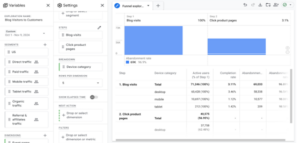
Save The Exploration As A Custom Report
Go to the Reports section in the left panel on your GA4 Dashboard, find the Library option at the bottom left of the Reports section.
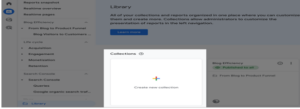
Click on the “Create new collection” box and choose the Blank one.
Give a descriptive name to the collection.
Create a new topic to define your custom report.
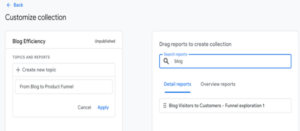
Find your exploration report by searching in the right panel, and once you find it, drag and drop it into the topic box you’ve just created and click the Save button.
Go back to the Library, find your latest collection, click on the three dots icon, and then click the Publish option to make your custom report live.
Refresh the GA4 app, and now you can view your custom report in the left panel, just like GA4’s default reports.
eWoke is a leading SEO company in Kochi, Kerala, delivering result-driven strategies that improve search visibility, traffic, and conversions. With a strong focus on data, user intent, and long-term growth, we help businesses rank higher on Google and attract quality leads. If you are searching for a trusted SEO partner in Kerala, eWoke is here for you.
If you want to know more about our blogs, feel free to connect with our LinkedIn page.
Recent Posts
Google Gemini app adds AI music generation with Lyria 3.
Google is expanding the creative capabilities of the Gemini app with the beta launch of Lyria 3, a new AI-powered music gener...
LinkedIn shares top skills on the rise in marketing for 2026
LinkedIn published its latest listing of skills on the rise in marketing, which highlights key trends in skill development ba...
Introducing Markdown for Agents
The way content and businesses are discovered online is changing rapidly. In the past, traffic originated from traditional se...
Reddit Posts Strong Q4 and Full-Year Results
Reddit has published its latest performance update, with the platform adding another 5 million daily active users, while itâ€...