General Module Structure in Magento 2.0
In order to understand how a module works we need to find out how basic components like controller, model, block and view interact with each other. If you have already worked with Magento before you should know why we need these structural units and how the module structure was organized in previous Magento versions.
It all looked like this:
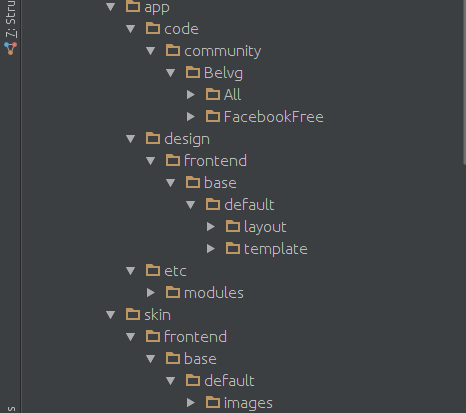
As we can see from this picture the module code was scattered across different directories (code, design, skin, etc).
A module in Magento 2 is located in a single directory which simplifies the search and analysis of the extension’s logic. Now the standard module structure looks like this:
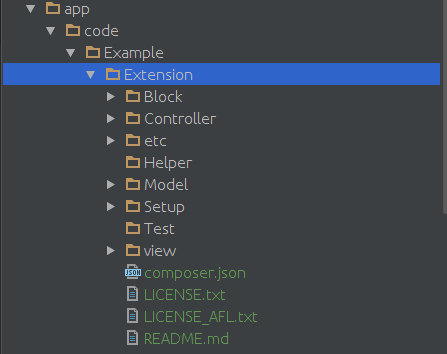
Let’s describe this structure. Once again all extensions are located in the app / code /. Then the following logic works:
• Example: it is a vendor’s name (as a rule it coincides with the company name and should be unique).
• Extension: module (extension) name.
The module includes the following:
• Block: stores files that will ensure the interaction of the patterns (phtml from the View directory) with extension models or the whole system (optional directory).
• ControllerÂ: these files are responsible for the connection of the module with the outside world i.e. switching on the module by clicking on an url. (Example site.com/extension/index/index lead to the module controller. (optional directory).
• etc contains the configuration files.
• Helper: contains the files that are responsible for performing general tasks for extension objects and variables.
• Model: contains the files that are responsible for connection with the database (optional directory).
• Setup: includes the files that are necessary to make changes in the database i.e. creating tables, fields, or other records required for the module performance (optional directory).
• Test: contains the files that are necessary to perform the module test. (optional directory).
• View:Â includes the files that are necessary for information output on the frontend and backend. Commonly these files contain html code (optional directory).
Understanding the module structure in Magento 2 allows analysis of the extension’s logic and performance as well as an easier job finding and fixing arising errors and conflicts.
Recent Posts
Google Gemini app adds AI music generation with Lyria 3.
Google is expanding the creative capabilities of the Gemini app with the beta launch of Lyria 3, a new AI-powered music gener...
LinkedIn shares top skills on the rise in marketing for 2026
LinkedIn published its latest listing of skills on the rise in marketing, which highlights key trends in skill development ba...
Introducing Markdown for Agents
The way content and businesses are discovered online is changing rapidly. In the past, traffic originated from traditional se...
Reddit Posts Strong Q4 and Full-Year Results
Reddit has published its latest performance update, with the platform adding another 5 million daily active users, while itâ€...