5 AI extensions to supercharge your Google Chrome browser

In 2025, your web browser will be used not only as a doorway to the internet, but also for writing, research, collaboration, and task automation. With AI extensions becoming more sophisticated and integrated, Chrome has evolved into a powerful productivity tool.
Whether you’re writing emails, summarising meetings, extracting data, or even trying to understand a 30-minute YouTube instructional, there’s likely an AI plugin that can help you complete these jobs faster, more effectively, or automatically. Here are five of the most adaptive and impressive AI-powered Chrome extensions to improve your online job experience.
Harpa AI – A power user’s command center
Harpa AI is an excellent choice if you want an AI assistant that can do more than communicate. Your web browser’s automation-focused AI interface allows it to conduct a variety of clever tasks, like summarising articles, rewriting text, obtaining data tables from websites, and tracking pricing changes on e-commerce sites.
Harpa launches a command interface by using the Alt + A keyboard shortcut. Commands can be used to summarise a webpage, reword specific content, or extract structured data from tables. Because of its interaction with multiple AI engines such as ChatGPT, Claude, Gemini, and Perplexity, as well as links to websites such as Make.com and Zapier, your browser becomes a primary hub for automation.
Harpa is perfect for professionals, researchers, content creators, or anyone who frequently engages in repetitive online tasks. While it may not be the easiest extension for beginners to navigate, those willing to understand the commands will find that Harpa evolves into a remarkably effective tool.
Glasp – Reading, highlighting & sharing
Glasp introduces an AI feature to enhance the way dedicated readers and students engage with content. The extension enables users to highlight parts of documents, PDFs, and web pages, and then utilize AI to create summaries of those highlights, identify key takeaways, or even generate flashcards for study purposes.
However, Glasp goes beyond merely being a tool for managing personal data. It offers a social aspect that allows users to explore, follow, and learn from one another’s highlights. Whether you’re studying for an exam, researching for a blog, or building a second brain, Glasp aids in recalling and reusing information more efficiently.
Compose AI – The autocomplete engine
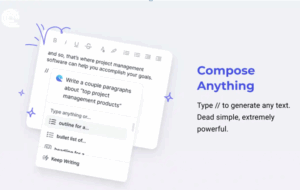
No matter if you’re responding to emails, creating LinkedIn posts, or developing blog articles, Compose AI functions like a smart writing helper that operates in real-time. It seamlessly integrates with your browser’s text input areas, such as Gmail, Google Docs, or any editable online form.
Compose AI anticipates your writing intentions and completes your sentences for you. It also allows you to rephrase text in various tones, generate entire paragraphs from the ground up, or quickly correct grammar and structure. Unlike conventional grammar tools, Compose has a more creative and generative focus prioritizing composition over mere correction.
If you spend a significant portion of your day typing, Compose AI can help reduce repetitive tasks and enable you to communicate more effectively with less effort.
Tactiq – Meeting notes, transcripts, and summaries
Online meetings are vital, but what about sitting through them and taking notes by hand? This is where Tactiq comes in. It gathers live transcripts from platforms like as Google Meet, Zoom, and Microsoft Teams, then applies AI to provide summaries, highlight action items, and extract key statements.
Tactiq eliminates the need for manual note taking in distributed teams, ensuring that no critical decision or task is missed in the cacophony. Notes can be synced with apps like as Notion, Google Docs, and Slack, allowing you to improve post-meeting operations without relying on recordings.
Scribe – Documenting your actions
If you’ve ever needed to write a how-to guide or walk someone through an online process step by step, Scribe is your go-to tool. It automatically records your screen as you conduct a task and converts it into a tidy, shareable guide with screenshots and instructions.
Scribe simplifies documentation, whether you’re on boarding new team members, writing standard operating procedures, or sharing training with clients. Its AI enhances clarity, arranges the guide for readability, and enables quick sharing across platforms. It’s a subtle productivity boost that has a tremendous impact, especially on teams and trainers.
Final Thoughts
What unifies these tools is their capacity to streamline tasks, minimizing the cognitive and manual burdens associated with digital tasks. Whether you work as an analyst, content creator, marketer, researcher, or student, the appropriate AI extension can allow you to concentrate less on trivial tasks and more on significant work.
As Chrome and other browsers increasingly incorporate AI into the browsing experience, these extensions provide a preview of a future where your browser not only displays content but also comprehends, transforms, and assists you in taking action on it right away.
If you want to know more about our informational blog, connect with our LinkedIn page.
Recent Posts
Google Gemini app adds AI music generation with Lyria 3.
Google is expanding the creative capabilities of the Gemini app with the beta launch of Lyria 3, a new AI-powered music gener...
LinkedIn shares top skills on the rise in marketing for 2026
LinkedIn published its latest listing of skills on the rise in marketing, which highlights key trends in skill development ba...
Introducing Markdown for Agents
The way content and businesses are discovered online is changing rapidly. In the past, traffic originated from traditional se...
Reddit Posts Strong Q4 and Full-Year Results
Reddit has published its latest performance update, with the platform adding another 5 million daily active users, while itâ€...